I lost my phone that could split screen normally, was looking for an app that could do this on my new one, and this app is perfect, works just like my old phone's split screen feature
Run Two Apps at Once, Effortlessly
Stop switching back and forth between apps. Split Screen Launcher lets you open two apps side-by-side with a single tap, saving you time and boosting your productivity instantly.
4.1
Rating
1,000,000+
Downloads

Everything You Need to Multitask Better
1
Launch Apps Instantly
Start two apps simultaneously with just one tap. No more wasting time switching back and forth – get straight to work with your favorite app combinations ready to go whenever you need them.
2
Save Your Favorite Pairs
Create custom app combinations that match your daily workflow. Whether it's messaging while browsing or taking notes during video calls, your most-used pairs are always one tap away for instant access.
3
Adjust Your Screen Layout
Take full control of how your screen divides. Customize the split point to give more space to the app you need most, or keep it balanced – the choice is yours for every task.
4
Fast and Lightweight Design
Enjoy smooth multitasking without slowing down your phone. Split Screen Launcher runs efficiently on any device, requires no invasive permissions, and keeps your workflow seamless and secure.
Split Screen Launcher - Effortless Multitasking on Your Phone!
Ready to boost your productivity by running two apps at the same time? Split Screen Launcher is the perfect tool for multitaskers who want to open two windows on their phone simultaneously. Whether you're comparing information, chatting while browsing, or using navigation and messaging together, Split Screen Launcher simplifies your workflow. With smooth dual-window functionality, your multitasking experience will be faster, more flexible, and more efficient than ever!
Multitask smarter, not harder, with the intuitive features of Split Screen Launcher.
Split Screen Launcher Key Features:
- Launch two apps simultaneously with one tap
- Customize your Split Screen App: Multitasking combinations
- Save your favorite app pairs for quick access
- Works seamlessly on supported devices
- Toggle between single and Split Screen Dual Window mode easily
- Enhance productivity with side-by-side viewing
- Streamlined interface for a better multitasking experience
- Lightweight, fast, and easy to use
- Perfect for Split Screen App: Multitasking needs anytime
Maximize Your Screen with Dual App Viewing!
The Split Screen App: Multitasking functionality lets you take full advantage of your phone's capabilities. Launch two apps side-by-side without switching back and forth—saving time and keeping your workflow seamless. Whether you're a student taking notes while attending online lectures or a professional monitoring email while reviewing documents, the Split Screen App: Multitasking tool makes multitasking effortless and reliable.
Split Screen Launcher enables you to work or play in two apps simultaneously, making your tasks faster and more efficient. By choosing your favorite app pairs and customizing your layout, the Split Screen Launcher ensures you always stay productive.
Customize Your Experience:
Split Screen Dual Window mode allows you to tailor your setup. Use the split point to control where the screen divides and adjust it according to your needs. Whether you want equal screen space or prefer a dominant app on one side, Split Screen Dual Window gives you the flexibility to adapt the screen for any task.
Smart and Simple Setup:
The user-friendly interface of Split Screen Launcher makes it easy to get started. Just select your two apps and start multitasking. You can even save your preferred setups for one-tap access later. From messaging and video to browsing and notetaking, Split Screen Launcher adapts to your lifestyle with zero hassle.
Speed Meets Productivity:
Switch from one app to another without closing windows. Split Screen Dual Window helps you manage work, entertainment, and communication side by side. No more interruptions—just smooth multitasking. With the power of Split Screen Dual Window, you can experience true efficiency on your mobile device.
Unlock True Multitasking with Split Screen Launcher
Whether you're managing daily tasks or juggling between work and fun, Split Screen Launcher and its Split Screen App: Multitasking abilities help you get things done. With the added power of Split Screen Dual Window mode, you're always one step ahead. Start multitasking like a pro and take control of your screen today!
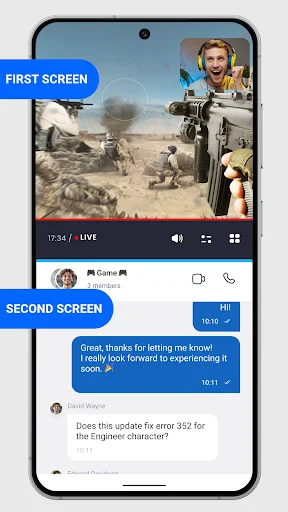
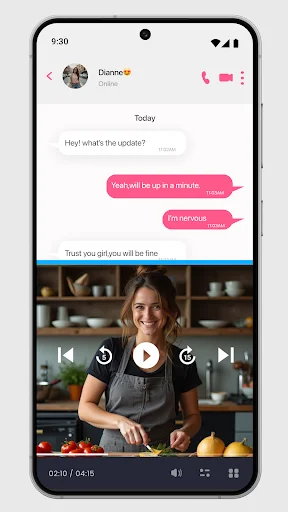
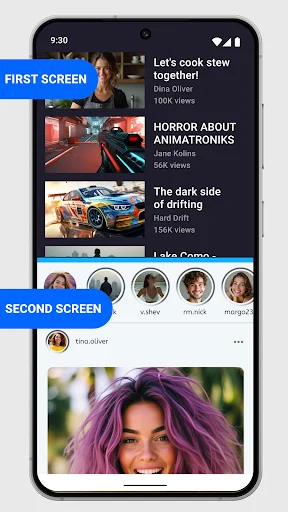
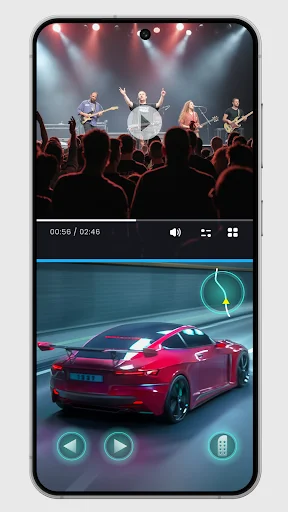
See Split Screen Launcher in Action
Join Over a Million Happy Multitaskers
use a low end phone with split screen I get experience of high end phones that come naturally with split screen. great coding keep up the good work Split Screen Launcher
I love it..like it's actually the first split screen launcher that actually works..5 stars to you guys 💯..the ads are also almost non existent.. good job
Works perfectly. I don't think it has any bad intentions either since my phone didn't give any warnings. Also it didn't ask for any permissions.
Great app. works just as intended. not to mention how lightweight it is as well. thanks to developer for this.
ai apss ta khub Valo Ami dekhese khub sondor ata apss ....amr khase khub e Valo lagse ai apss ta